

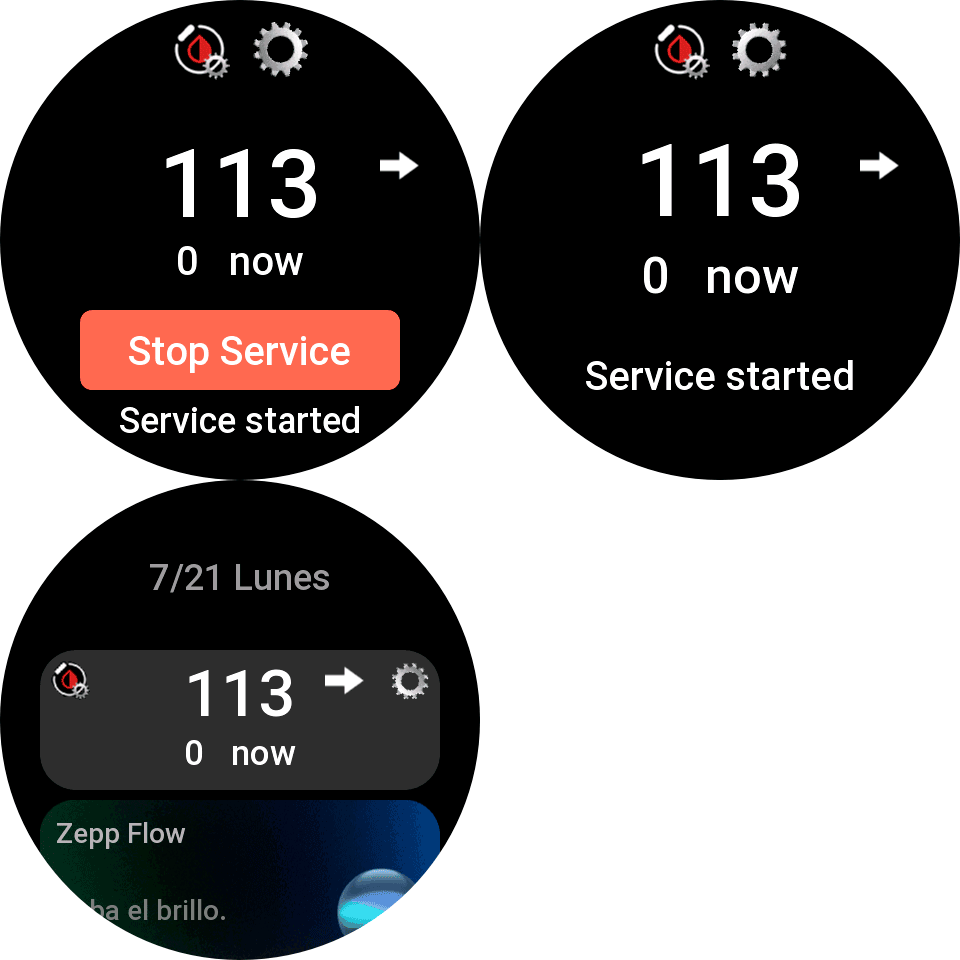

New app that receives BG data from mobile, only compatible with ZEPPOS 3 and newer. Data is received as soon as it’s produced (without delay and less battery consumption), everything is done in the background and there is no interruption of synchronization due to pending notifications…
Instructions are as follows… you need to install the mini-app and press the button to start the service (it will ask you for permissions to run the service and check it to start it). Once started, you will receive a notification indicating that it has started.
You also need to update the watchface to any compatible…
Also added a shortcut-card and a widget that you can add to the watch to view glucose data and the service status at a glance.
Important, don’t uninstall watchdrip mini-app, If for any reason the service stops, the watchfaces will automatically operate with the previous system…
2.0.3 update:
- Added watchdog to restart service automatically if zeppos system stops it…
- Removed notifications of start and stop service, to check if service is started you can see at mini-app or shorcut-card or widget…
2.0.4 update:
- Fixed service animation in shortcut-card…
2.0.5 update:
- Changed High and Low BG color…
2.0.6 update:
- Fixed GTR4 connection problems and random connection problems in some watch models startup…
2.0.7 update:
- Minor bugs fixed.
2.0.8 update:
- Added support for Active Max.
- Fixed GTS4 connection problems.
- Optimize battery consumption and reduce execution time to avoid occasional service interruptions.
2.0.9 update:
- Added support for DND, power saving, sleep, theater modes. When one of these modes is activated data sync frequency is 5 minutes to prevent service stop…
Enjoy.
24 Responses
Hi, is that available for GTS 4 Mini?
Thank u in advance!
Hi, I’m sorry but it’s not possible for gts4mini, It’s necessary zepp os 3 and later, gts4mini have zeppos 1…
Hello.
Thanks for your work!
Installed 2.0.7 and got a significant battery drain. 100% to 0% in 2-3 days without AOD.
So I returned to bigdigital’s app. But your app I do like much more.
Could you please check this issue with battery drain? Would like to use your app instead.
Thanks!
Hi, what watch model do you have? and what update interval do you have for your CGM sensor? this service update data every change of value, but with the old app only is possible every 5 minutes…
Device log shows
jsapp:25977 Exception error: SyntaxError: unexpected token: ‘undefined’
When I Start service.
I have GTS4 (regular) with last zeppos 3, last watchface WD-Color-V2 by you.
I installed Watchdrip Service 2.0.7 (and removed Watchdrip app v2.0.6 by bigdigital) again to check and this time it shows “no data” on watchface and on the Watchdrip Service screen just “service started” and moving gear on the top right edge, black screen on the middle.
If I install both (yours and bigdigital’s), than your app show black screen and “Service started”, but data comes via bigdital app.
Please reach me at [email protected] if you are interested to know more and fix. I would love to give your any info you need.
Hi, maybe it would be a problem with something remaining from last installation… You can try to factory reset your watch and reinstall again watchface and service…
Another hint would be that you Zeppos is not updated to latest for gts4… It would be Zeppos3.5 with API 3.6…
Thanks for your reply.
Just did a factory reset on GTS 4, reintalled service (and turned it on) and watchfaces. It shows no difference, No data.
I also checked, that Zeppos version on the GTS 4 is 3.5, version 6.0.8.1 (donno about API version)
Here are logs:
Device logs
jsapp:25977 Exception error: SyntaxError: unexpected token: ‘undefined’
App log
There are two entryes repeating over and over again:
2. {“jsonrpc”:”hmV1.0″,”method”:
{“module”:”main.console.out”,”action”:”log”},”params”:{“level”: 2,”appld”:-1,”timestamp”:1768383379788,”scope”:”side-4.1.0-release.5-402″,”name”:”schedule”,”tag”:”-“,”message”:”interrup t”}}
3. {“jsonrpc”:”hmV1.0″,”method”:
{“module”:”main.console.out”,”action”:”log”},”params”:{“level”: 2,”appld”:-1,”timestamp”:1768383379791, “scope”:”side-4.1.0-release.5-402″,”name”:”schedule”,”tag”:”-“,”message”:”[interrup t] processInfo list => [{\”pid\”:\”152c7c077a936d-1c63d5fd1 110d3-1d38f783fd41a3-10e40f9fde1ef1\”,\”appId\”:25977,\” port1\”:20,\”port2\”:1213,\”mode\”:0,\”type\”:\”User\”, \”status\”:[3,\”Running\”],\”startTime\”:\”2026-01-14 11:28:46\”,\”latestUsed Time\”:\”2026-01-14 11:35:01\”, \”estimatedIdleTime\”:\”2026-01-14 11:45:01\”,\”cpuTime\”: \”0:0:7:33\”}]”}}
Oh, i found where API level is. It shows 305.
Zepp shows theat watch is updated to the last firmvare (at least there is no updates available). How can I update API level to 3.6?
Sorry, just found out that you have answered.
I have GTS4 (regular) with last zeppos 3, last watchface WD-Color-V2 by you.
I installed Watchdrip Service 2.0.7 (and removed Watchdrip app v2.0.6 by bigdigital) again to check and this time it shows “no data” on watchface and on the Watchdrip Service screen just “service started” and moving gear on the top right edge, black screen on the middle.
If I install both (yours and bigdigital’s), than your app show black screen and “Service started”, but data comes via bigdital app.
Please reach me at [email protected] if you are interested to know more and fix. I would love to give your any info you need.
Hello, I have an Amazfit Balance 2 watch. Everything works great except for one thing. Every 24 hours, my WatchDrip Service app changes from “Service started” to “Service stopped”, and I have to manually start the service again each time (every 24h). Is there any way to fix this?
Hi, update to last version…
Hi there! Just bought Amazfit Active Max and wondering when may I expect integration with Watchdrip? Thanks in advance!
Hi, I have updated this solution for supporting Active Max, also all my watchfaces compatibles with balance are uptdated to support Active Max… Regards…
Thank you! It works well, but I wonder how may I make it work without “classic” Watchdrip App installed on my Active Max (becausr currently it doesn’t work) to use Watchface with data source from your app. Now trying to install Watchface does not work because I dont have Watchdrip App and I cant install the app – current version doesnt work (2.0.7). Do you have any solution?
Hello, it is not necessary to install the classic app, all my watchfaces are compatible with both apps separately… if you have data with the service, it should appear on the watchfaces… only make sure that service is started to refresh data…
Problem is I can’t install watchfaces from this site – how may I do it to make it work? What should I do step-by-step?
When I try to install watchface I got an error: “An error occured, try again later. Watch face does not support bound device”
Sorry, now I made it work – I just have noticed that there are watchfaces created by you, only they work on the watch. Thank you very much!
Hola,me gustaria saber como poder descargar la mini-app watchdrip, pero laverdad el qr de la pantalla no me lleva a ningun sitio para descargarla,podeis darme el enlace para poder descargar esta mini app,y si tengo que hacerlo dentro mi app Zepp o en mi movil,muchas gracias por vuestra aportacion.
Hola, debes usar el QR que se muestra en la página, este QR se debe leer desde la aplicación Zepp, en el dispositivo/General/Modo de desarrollador… arriba hay un signo + desde el cual con la cámara lo puedes leer.
Antes debe activar el modo desarrollador, lo puedes activar siguiendo las instrucciones de esta página https://bigdigital.home.blog/2022/12/21/zepp-os-devices-support/
Could you create a watchface for active 2 square? Got to the stage with the face and no face is available for square 2. Thank you
Hi, all of my watchfaces compatibles with bip6 may works with active2 square… maybe would be a problem with active2 square filter…