

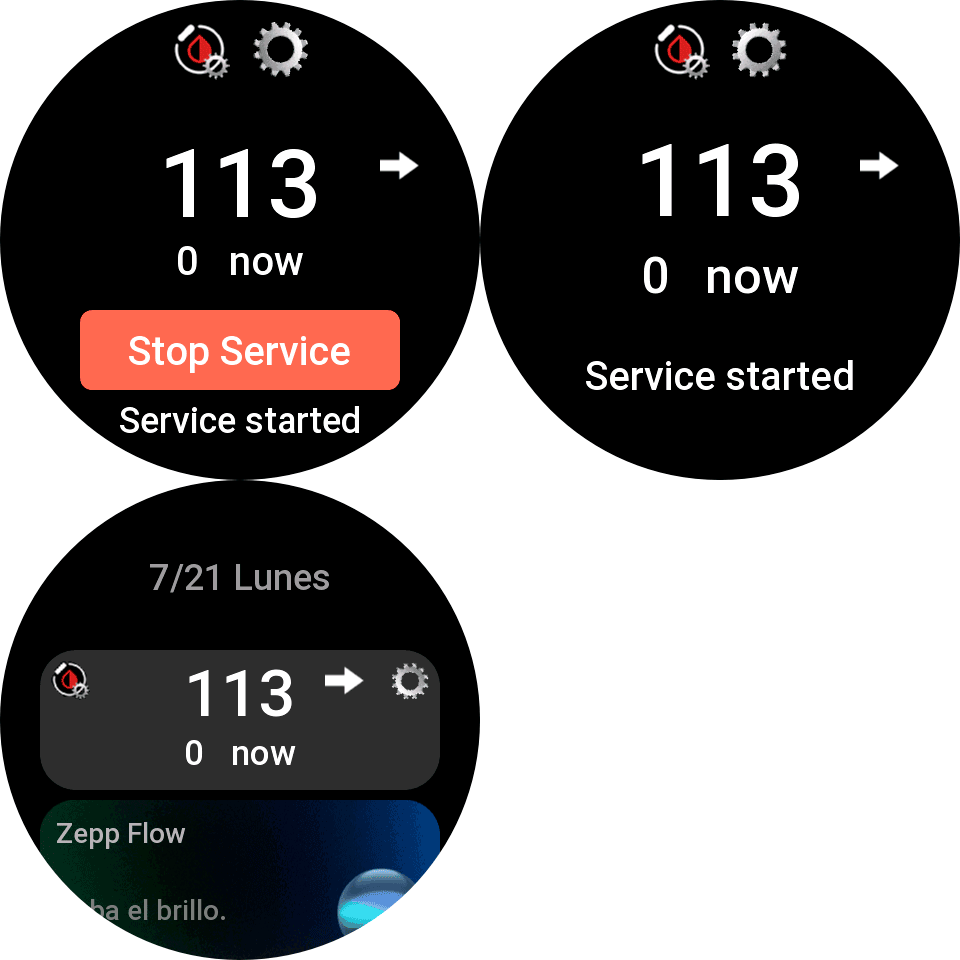

New app that receives BG data from mobile, only compatible with ZEPPOS 3 and newer. Data is received as soon as it’s produced (without delay and less battery consumption), everything is done in the background and there is no interruption of synchronization due to pending notifications…
Instructions are as follows… you need to install the mini-app and press the button to start the service (it will ask you for permissions to run the service and check it to start it). Once started, you will receive a notification indicating that it has started.
You also need to update the watchface to any compatible…
Also added a shortcut-card and a widget that you can add to the watch to view glucose data and the service status at a glance.
Important, don’t uninstall watchdrip mini-app, If for any reason the service stops, the watchfaces will automatically operate with the previous system…
2.0.3 update:
- Added watchdog to restart service automatically if zeppos system stops it…
- Removed notifications of start and stop service, to check if service is started you can see at mini-app or shorcut-card or widget…
2.0.4 update:
- Fixed service animation in shortcut-card…
2.0.5 update:
- Changed High and Low BG color…
2.0.6 update:
- Fixed GTR4 connection problems and random connection problems in some watch models startup…
2.0.7 update:
- Minor bugs fixed.
2.0.8 update:
- Added support for Active Max.
- Fixed GTS4 connection problems.
- Optimize battery consumption and reduce execution time to avoid occasional service interruptions.
2.0.9 update:
- Added support for DND, power saving, sleep, theater modes. When one of these modes is activated data sync frequency is 5 minutes to prevent service stop…
2.1.0 update:
- Added support for Active 3 Premium.
- Added support for T-Rex Ultra 2.
- Added support for cheetah 2 pro and ultra
- Added support for Bip Max
- Added Balance 3 and ultra
Enjoy.
63 Responses
Hi, is that available for GTS 4 Mini?
Thank u in advance!
Hi, I’m sorry but it’s not possible for gts4mini, It’s necessary zepp os 3 and later, gts4mini have zeppos 1…
Hello.
Thanks for your work!
Installed 2.0.7 and got a significant battery drain. 100% to 0% in 2-3 days without AOD.
So I returned to bigdigital’s app. But your app I do like much more.
Could you please check this issue with battery drain? Would like to use your app instead.
Thanks!
Hi, what watch model do you have? and what update interval do you have for your CGM sensor? this service update data every change of value, but with the old app only is possible every 5 minutes…
Device log shows
jsapp:25977 Exception error: SyntaxError: unexpected token: ‘undefined’
When I Start service.
I have GTS4 (regular) with last zeppos 3, last watchface WD-Color-V2 by you.
I installed Watchdrip Service 2.0.7 (and removed Watchdrip app v2.0.6 by bigdigital) again to check and this time it shows “no data” on watchface and on the Watchdrip Service screen just “service started” and moving gear on the top right edge, black screen on the middle.
If I install both (yours and bigdigital’s), than your app show black screen and “Service started”, but data comes via bigdital app.
Please reach me at [email protected] if you are interested to know more and fix. I would love to give your any info you need.
Hi, maybe it would be a problem with something remaining from last installation… You can try to factory reset your watch and reinstall again watchface and service…
Another hint would be that you Zeppos is not updated to latest for gts4… It would be Zeppos3.5 with API 3.6…
Thanks for your reply.
Just did a factory reset on GTS 4, reintalled service (and turned it on) and watchfaces. It shows no difference, No data.
I also checked, that Zeppos version on the GTS 4 is 3.5, version 6.0.8.1 (donno about API version)
Here are logs:
Device logs
jsapp:25977 Exception error: SyntaxError: unexpected token: ‘undefined’
App log
There are two entryes repeating over and over again:
2. {“jsonrpc”:”hmV1.0″,”method”:
{“module”:”main.console.out”,”action”:”log”},”params”:{“level”: 2,”appld”:-1,”timestamp”:1768383379788,”scope”:”side-4.1.0-release.5-402″,”name”:”schedule”,”tag”:”-“,”message”:”interrup t”}}
3. {“jsonrpc”:”hmV1.0″,”method”:
{“module”:”main.console.out”,”action”:”log”},”params”:{“level”: 2,”appld”:-1,”timestamp”:1768383379791, “scope”:”side-4.1.0-release.5-402″,”name”:”schedule”,”tag”:”-“,”message”:”[interrup t] processInfo list => [{\”pid\”:\”152c7c077a936d-1c63d5fd1 110d3-1d38f783fd41a3-10e40f9fde1ef1\”,\”appId\”:25977,\” port1\”:20,\”port2\”:1213,\”mode\”:0,\”type\”:\”User\”, \”status\”:[3,\”Running\”],\”startTime\”:\”2026-01-14 11:28:46\”,\”latestUsed Time\”:\”2026-01-14 11:35:01\”, \”estimatedIdleTime\”:\”2026-01-14 11:45:01\”,\”cpuTime\”: \”0:0:7:33\”}]”}}
Oh, i found where API level is. It shows 305.
Zepp shows theat watch is updated to the last firmvare (at least there is no updates available). How can I update API level to 3.6?
Sorry, just found out that you have answered.
I have GTS4 (regular) with last zeppos 3, last watchface WD-Color-V2 by you.
I installed Watchdrip Service 2.0.7 (and removed Watchdrip app v2.0.6 by bigdigital) again to check and this time it shows “no data” on watchface and on the Watchdrip Service screen just “service started” and moving gear on the top right edge, black screen on the middle.
If I install both (yours and bigdigital’s), than your app show black screen and “Service started”, but data comes via bigdital app.
Please reach me at [email protected] if you are interested to know more and fix. I would love to give your any info you need.
Hello, I have an Amazfit Balance 2 watch. Everything works great except for one thing. Every 24 hours, my WatchDrip Service app changes from “Service started” to “Service stopped”, and I have to manually start the service again each time (every 24h). Is there any way to fix this?
Hi, update to last version…
Hi there! Just bought Amazfit Active Max and wondering when may I expect integration with Watchdrip? Thanks in advance!
Hi, I have updated this solution for supporting Active Max, also all my watchfaces compatibles with balance are uptdated to support Active Max… Regards…
Thank you! It works well, but I wonder how may I make it work without “classic” Watchdrip App installed on my Active Max (becausr currently it doesn’t work) to use Watchface with data source from your app. Now trying to install Watchface does not work because I dont have Watchdrip App and I cant install the app – current version doesnt work (2.0.7). Do you have any solution?
Hello, it is not necessary to install the classic app, all my watchfaces are compatible with both apps separately… if you have data with the service, it should appear on the watchfaces… only make sure that service is started to refresh data…
Problem is I can’t install watchfaces from this site – how may I do it to make it work? What should I do step-by-step?
When I try to install watchface I got an error: “An error occured, try again later. Watch face does not support bound device”
Sorry, now I made it work – I just have noticed that there are watchfaces created by you, only they work on the watch. Thank you very much!
Hola,me gustaria saber como poder descargar la mini-app watchdrip, pero laverdad el qr de la pantalla no me lleva a ningun sitio para descargarla,podeis darme el enlace para poder descargar esta mini app,y si tengo que hacerlo dentro mi app Zepp o en mi movil,muchas gracias por vuestra aportacion.
Hola, debes usar el QR que se muestra en la página, este QR se debe leer desde la aplicación Zepp, en el dispositivo/General/Modo de desarrollador… arriba hay un signo + desde el cual con la cámara lo puedes leer.
Antes debe activar el modo desarrollador, lo puedes activar siguiendo las instrucciones de esta página https://bigdigital.home.blog/2022/12/21/zepp-os-devices-support/
Could you create a watchface for active 2 square? Got to the stage with the face and no face is available for square 2. Thank you
Hi, all of my watchfaces compatibles with bip6 may works with active2 square… maybe would be a problem with active2 square filter…
Hola, es cierto, no sale ninguna esfera para el active 2 cuadrado y las de bip 6 dice que no son compatibles. Un saludo
Hola, las mías del bip6 deberían de funcionar, ya que tienen el id del reloj incluido… prueba una de las mías, si no te funciona indícame el valor que te sale en la pantalla de zepp siguiente: dispositivo/general/modo desarrollador/(en el signo +)/device info… y sería el valor de “device source”
He visto que amazfit ha añadido 3 ids de dispositivos nuevos para el active 2 square… los he agregado a mis esferas, ya aparecen en la lista, supongo que ahora funcionarán correctamente.
Hi may I have the APK for the service, I use gadgetbridge to manage the zeppos watch. Also the watchface bin file for WD color.
Gadgetbridge has an installer that works great but needs files not QR codes. Thank you for amazing work.
Hi you can download two projects (WD Color) and (Watchdrip Service) from my github (https://github.com/miguelavh) and compile with zeus-cli from amazfit to obtain zpk files… Regards
Thank you, I didn’t realize it wouldn’t notify about replies. I’m afraid compiling to APK is beyond my skillset. I’ll try to find someone that understands how.
Здравствуйте. После переустановки патченого Ми фитнес не появляются в приложении вотчдрип и вотчдрип ксиоми. Нет циферблатов, вообще пусто. Еще вчера и позавчера, и месяц назад все работало. Что делать? Помогите, пожалуйста
Все заработало уже
Great!
Unable to download WatchFace on Bip Max. Watchdrip-Service app can be downloaded and run.
The message states that WatchFace does not support the associated device.
Still no watchfaces supported for bip max…
So, as I understand it, the Bip Max is partially compatible: Watchdrip-Service can be downloaded, launched, and assigned to a button for quick access, but there are no watchfaces available for the Max.
The question is, do I need to wait for your square watchfaces to be adapted for the Max, or should I wait for someone to develop a watchface specifically for it?
Hi I have adapted WD-Energy, WD-Simply and WD-Color-V2 to be compatible with bip max…
Thank you very much
Hi, I’ve been using the T rex 3 pro 44mm for a few days now. I can see my glucose levels on the dials, and everything works fine. My only concern is the battery, which lasts 6 days (the manufacturer claims about 17 days). I had the Joselekis F17 on my Balance 1, and the battery lasted up to 14 days, as promised by the manufacturer. What could be the cause?
Hi, the problem could be the watchface, Is there any text field scolling at AOD screen? if so, change your watchface and try… scroll wastes a lot of battery…
Check out the T-Rex group; users report charging it every 7 days with moderate use. Of course, that’s without using watch faces or apps like Watchdrip that run in the background. So, if you use the watch with even moderate intensity, the battery will last a maximum of 7–8 days.
I using T Rex pro 44mm and watchface nimrod100 GTR-WDRoundDigital V2.
Trex 3 pro 44 mm
I have a question—or rather, two. The first concerns the readings on the watch face: when the phone is connected to Wi-Fi, readings from Watchdri-Service appear immediately; however, when I’m away from home—either offline or on mobile data—new readings are sometimes delayed by 2–3 minutes. This isn’t a constant lag, but it happens a dozen or so times a day.
The second issue concerns the WD – Simply and WD – Color -v2 watch faces and their graphs. When blood sugar levels are high, the graph line overlaps the time display (showing the hour or the time of the last reading). While the graph can be disabled in WD – Color, unfortunately, that’s not an option in WD – Simply. That’s a shame, because WD – Simply is my favorite face, but the graph disrupts its aesthetic.
Hi, in response to the first question… I never tried Wifi connection, maybe is related to bluetooth speed and data sync in these moments (maps, and health data)…
Regarding the second question, the graphs have limited space, and sometimes the line could be drawn over other elements on the watchfaces. In these cases, a decision needs to be made: whether to draw the graph even in these cases or not. My choice is always to draw the graph whenever possible… In WD-Color-V2, it’s possible to hide the graph, but you lose that part of the information, it’s up to you… WD-Simply, as its name suggests, is very simple and doesn’t allow editing, like before, it’s displayed just as it comes… Maybe It’s possible that not everyone agrees with this…
Yeah, I know—you’re doing a great job anyway.
By the way, is there anywhere I can create my own watch face, or perhaps modify existing ones using some kind of program?
Why isn’t the Joselekis F17 watch face working on the T Rex 3 Pro? I really like it, I used it on my previous smartwatch.
Ask the author for the change on the watchface page
Hi, quick question: does the app support the rectangular Active model, or just the round one? I’m referring to the Active 1.
yes, it’s at list of compatible models at beginning of the page…
So, watch faces from the Bip 6 and other rectangular models will work.
yep
Hi, I have a question about the AAPS watch face that’s based on your WD Color. Do AAPS faces also require the Watchdrip service to work? You might know about this, as a friend of mine is planning to buy a watch for AAPS.
yes, Watchdrip service is mini-app to receive Watchdrip+ data from mobile… AAPS is the origin of data as xdrip but Watchdrip+ and watchdrip service is mandatory to receive data at watch…
Hi, I’m using Watchdrip-Service, Watchdrip 0.5.0, and the WD Simply – TIR watch face; what settings do I need to configure to display the TIR result?
The TIR result is indeed displayed on the AOD screen, but it constantly shows 100%. Naturally, the AOD causes the battery to drain quickly.
Update Simply-TIR watchface, I have added TIR at normal mode… 100% is since you have update watchdrip+ to 0.5.0 version, it could stable since 00:00 hours of the next day…
Thanks a lot—the dial looks great now; it’s a small detail, but it makes a difference.
Hi, I have a technical question. Does the TIR value in Watchdrip 0.5.0 only read from xDrip, or can it also pull data from other apps like Juggluco or GlucoDataHandler?
Hi, TIR is calculated in watchdrip 0.5.0 with data provided by xdrip or juggluco or GDH…
Hi, does Watchdrip-Service work with the Balance 2 XT? It’s not listed in the description.
Yes