


Watchface compatible with Watchdrip mini-app v2.0.2 or higher for compatibility with ZeppOS 3 and newer…
Also compatible with new Watchdrip+ Service app for ZeppOS 3 and newer…
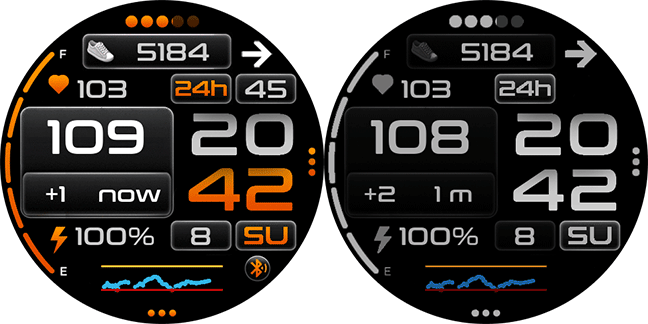
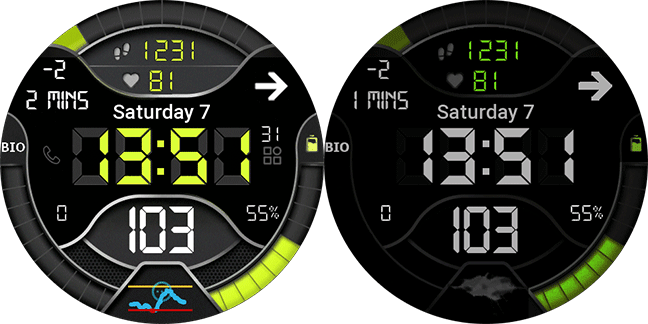
Editable and AOD compatible.
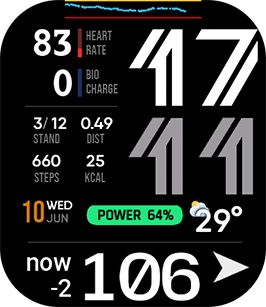
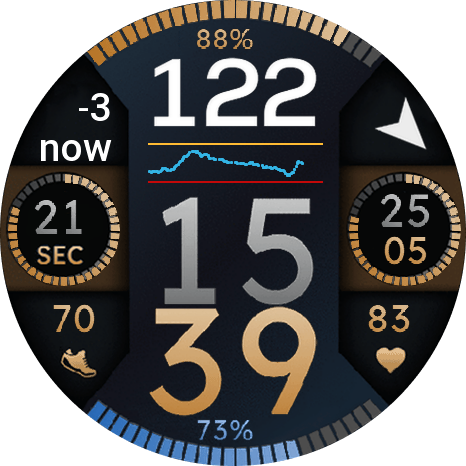
This version features 7 editable data widgets. You can change the data displayed in edit mode on the watch. Long-tap the watchface and tap the blue pencil below the watchface.
Also this watchface have a direct access to light adjust screen to control watch brightness.
Fixed retry time between failed readings.
Added mobile phone battery widget selectable option…
Added Support for Bip Max
Added TIR widget selectable option…
Enjoy…
36 Responses
Hi, for compatibility with v3.5 and v4 zeppos… install watchdrip mini-app modified version that I send to this message at discord group
https://discord.com/channels/1065000078269481041/1065186755474636830/1309892169040920602
Can you please send it to [email protected] since I cannot open the link and join the channel.
Thank you in advance
Update to last version https://watchdrip.org/apps/watchdrip-app/ now is fully compatible with zeppos3.5 and 4
Thank you for your all great work~!
Would you please add T-rex 3 model ?
Hi, Trex3 is compatible, but is not added at this platform, when @bigdigital added this model to watchdrip.org you could download this watchface…
Hi, i’ve just received an Amazfit balance and i would like to create some new watchface with watchdrip . Do you have some tutorial or can you give some information to do that ?
Thanks a lot for your work
Hi, there is no tutorial, but you can download this complete project from my github https://github.com/miguelavh/WD-Color-Watchface so you can modify or use like a base… Regards.
Thank you i will try that. Can you just explain how you download the zip file to your watch ? I try to convert in zpk and generate a QRCode with Zint Barcode and go to zepp developper mode but the Watchface doesn’t install.
You must review Zepp documentation, “zeus preview” is the command to create temp QR… see this url with all about zeus compiler and api for zepp os https://docs.zepp.com/docs/guides/tools/cli/?_highlight=zeus
Hi,
Thank you nimrod100, very good job.
Only one problem, in the weather temperature don’t change 😉
Hello,
Thank you so so much for creating this! After 1 year since the OS update I was not able to get my BG on the GTR4 watch but it finally works! You are the best!
Have a nice day,
Vendy
Hi, thank you for your work. Will the Amazfit BIP 6 also be supported?
Now is compatible with bip6, but needed that watchdrip.org and zeppos mini-app will be compatible too…
Thank you nimrod100 for making it compatible.
@bigdigital Is it possible to include the Amazfit BIP 6 to watchdrip and zeppos mini-app?
I was able to install it on the Bip 6 today
Hi @JCarl, thanks for your reply. I bought the BIP 6 yesterday and i can also confirm its working great. Thumbs Up
JCarl, can you tell me the steps you took to get your bg numbers on the Bip 6? I’ve followed the configuration instructions (xdrip+, watchdrip+ and mini app) but the watchface still doesn’t receive/display the bg that is showing up in watchdrip and xdrip. Thanks!
amazfit active 2 and zepp app 9.6.1. i installed app 2.0.5. when i try install watch face i got error “download failed”
Hi, @bigdigital must update web to include new devices ids for active2…
Hi. Thank you very much for your work. Is there any other option to download the watchface? Download by using the QR does not work. Could it be geo block if my Zepp account is Russian? I was using the watchdrip app and your watchface before – it was really helpful. But on a new phone I can’t download the watchface again.
No, Only here is available… If it’s a region block, you can use one VPN in your smartphone to read QR and install watchfaces…
Hola
No soy capaz de instalarla mediante Zepp en modo desarrollador (no me aparece el menú de desarrollador para instalar aplicaciones y watchfaces).
Sería posible facilitarme por favor la descarga del archivo bin para instalarlo mediante una ruta alternativa?
Gracias de antemano
No es posible, ya que sobre todo la mini-app necesita de una parte instalada en la propia Zepp App que no podrias instalar si no es con el metodo de developer…
Necesito una wf para un amazfit GTR 47mm que incluya valores de glucemia de xDrip.
Existe alguna publicada que pueda instalar?
Lo agradecería muchísimo..
Saludos y gracias de antemano
Just purchased the Amazfit Active 2 and have gone through all the tutorial from https://bigdigital.home.blog/2022/12/21/zepp-os-devices-support/#tutorial to show blood sugar levels on the watch, but watch face displays “No data available” for blood sugar readings. The Watchdrip+ phone app is displaying all current data from the xDrip app, but not showing on watch face. WatchDrip Zepp app is version 2.0.6, Zepp app is version 9.9.6, device version is 6.1.20.3. Phone is a pixel 8a Android version 15. Did I miss something in the tutorial?
Hi first time, you need to open watchdrip+ app at watch to start receiving data…
Is it possible to also send xdrip Alarms to the Bip6?
Hi, to receive alarms from xdrip you need at xdrip go to settings/alerts & alarms/glucose alerts settings and activate Notification channel (for android 8+). And activate notifications from xdrip in the zepp settings… with this settings you can receive low and high xdrip alerts…
Thank you very much, one setting was unchecked.
Hi, I have a problem. 90% of the time when I unlock my watch, instead of showing the xDrip value it shows the loading symbol. I’m using WatchDrip 2.0.6
You can activate AOD or use Watchdrip Service (if your watch has zeppos 3 or higher) instead of watchdrip+ mini-app…
Just wanted to say thank you for this watchface, I recently got the Amazfit Bip 6 and was disappointed to find there were no faces on watchdrip so I was delighted to find that you updated this for square watches and it’s really great and show’s all the information I need from xDrip as well as the useful activity data. Thank you nimrod!
the values disappear a lot. I need to restar the whatface to get the values again. All the other things work fine. Anyone else has the same problem?
Many thanks for your effort nimrod100. I am using Bip 5 Unity, Zepp app version is 10.0.9 and there is no graph on watch faces. Ive tried to change graph in Watch face- blue pencil still no luck. Any solution and help?
It is impossible to install this watchface (and any other ones for bip 6), there is “Download failed” sign
I use latest Zepp app v10.0.9 (but also tried earlier versions: 9.14.2 (same problem) and some 8+ versions (impossible to connect bip6)
None of the watchfaces for the BIP 6 from this site work (At the same time, any other watch faces from amazfitwatchfaces can be installed without any problems.)
I dont know how to fix this problem 🙁
Please help if anybody know the solution
Problem solved in Discord (got new QR code for my bip 6)